Making Memories Last: Choosing the Right DPI for Your Photo Scans in Raleigh, NC
Whether you're nestled in Raleigh or anywhere else, photo scanning breathes new life into your cherished memories. But with all the technical jargon surrounding the process, choosing the right DPI (dots per inch) can feel overwhelming. Fear not, fellow photo enthusiasts! This guide will help you navigate the world of DPI and ensure your Raleigh photo scanning project captures every precious detail.
Understanding DPI: The Building Blocks of Image Quality
Imagine your favorite childhood photo – perhaps a birthday party snapshot or a family vacation picture. Every detail, from the playful birthday hat to the backdrop of a breathtaking landscape, contributes to the emotional resonance of the image. Now, imagine this photo as a mosaic. The more tiny tiles (pixels) you have, the sharper and clearer the image becomes. DPI refers to the density of these pixels – the higher the DPI, the more pixels crammed into each inch, resulting in a more detailed scan.
Here's an analogy to solidify the concept: Imagine a newspaper photograph. Due to printing limitations, these photos often have a lower DPI, resulting in a slightly grainy appearance. Conversely, a high-resolution image on your computer monitor boasts a much higher DPI, displaying sharp details and vibrant colors.
300 DPI vs. 600 DPI: Unveiling the Sweet Spot
The world of photo scanning offers various DPI options, but two settings dominate the conversation: 300 DPI and 600 DPI. Let's delve into the advantages of each:
300 DPI: The All-Around Champion
This industry standard is a fantastic choice for most purposes. It delivers good quality scans that are perfect for:
- Sharing photos on social media or email:
- Most social media platforms have specific size requirements, and 300 DPI scans typically fall within these limitations. You can share your scanned memories with friends and family without compromising image quality.
- Printing personal albums or framing photos at standard sizes:
- Photo albums and standard-sized frames don't require exceptionally high resolutions. 300 DPI scans will ensure your printed photos look crisp and clear when viewed from a typical distance.
- Creating digital collages or slideshows:
- Breathe new life into your scanned photos by incorporating them into digital projects.
- 300 DPI offers a good balance between quality and file size, making it manageable for digital manipulation.
Here's an example: Imagine you have a box of cherished photos from your college years. You want to scan them and share them on Facebook with your college friends. Opting for 300 DPI scans will ensure clear and vibrant images on social media while keeping the file size reasonable for easy uploading.
600 DPI: Unveiling the Finer Details
If you crave exceptional detail or have specific uses in mind, consider opting for 600 DPI scans.
This higher resolution is ideal for:
- Creating professional, high-quality prints or fine art pieces:
- Professional photographers and artists often require high-resolution scans for creating museum-quality prints or showcasing their work in galleries.
- 600 DPI captures intricate details and ensures exceptional clarity for these applications.
- Blowing up photos for large-scale displays like posters:
- If you plan on displaying your scanned photos on large banners or posters, you'll need a higher resolution to maintain image quality.
- 600 DPI ensures your photos look sharp and detailed even when significantly enlarged.
- Scanning artwork or photos with intricate details:
- For photos with fine details like textures or intricate artwork, a higher DPI scan is recommended.
- 600 DPI will capture these details more accurately, preserving the essence of the original piece.
For instance, let's say you have a collection of family portraits you plan on enlarging and framing for your living room. To ensure the details on everyone's faces and clothing are preserved, opting for 600 DPI scans would be the ideal choice.
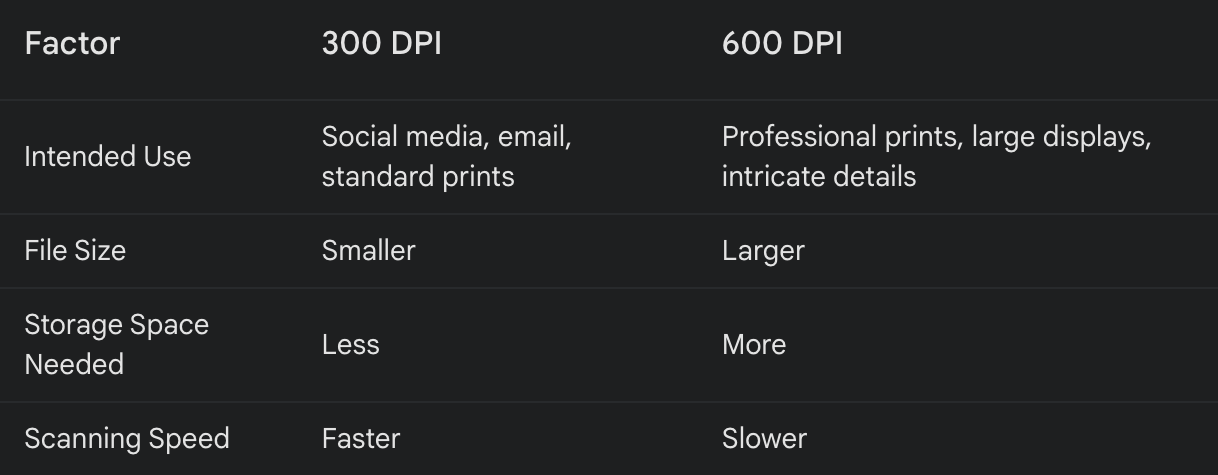
Choosing Your DPI Hero: A Decision Matrix
Here's a quick and easy guide to help you pick the perfect DPI for your Raleigh photo scanning project:
Beyond DPI: Unveiling the Full Picture
Remember, DPI is just one piece of the photo scanning puzzle. Here are some additional factors to consider for optimal results:
- Original Photo Quality: A blurry low-quality photo won't magically transform into a high-resolution masterpiece, regardless of DPI. The quality of your original photos will play a significant role in the final outcome of your scans. Faded or damaged photos may require restoration services before scanning to achieve the best possible results.
- Scanner Capabilities: Not all scanners are created equal. Ensure your scanner's optical resolution can handle the chosen DPI. Most consumer-grade scanners offer a maximum resolution of 600 DPI, while professional scanners can reach much higher resolutions. If you require exceptionally high-resolution scans, consider using a professional photo scanning service equipped with advanced scanning technology.
- Image Format: The format you choose to save your scanned photos can also impact quality and storage space. Here's a breakdown of some popular options:
- JPEG (Joint Photographic Experts Group): This is a widely used format offering a good balance between image quality and file size. JPEG uses a compression method that discards some data, resulting in a slight loss of quality, especially with repeated saving. However, for most purposes, the quality loss is negligible, making JPEG a popular choice for everyday photo scanning.
- TIFF (Tagged Image File Format): The go-to format for professional use, TIFF offers lossless compression, meaning no data is discarded during the saving process. This ensures the highest possible image quality and is ideal for professional printing, large-format displays, and archival purposes. However, TIFF files are significantly larger than JPEGs and require more storage space.
- PNG (Portable Network Graphics): This format is another option for lossless compression and is well-suited for web graphics and images with transparency. While PNG offers good quality, it can also result in larger file sizes compared to JPEG.
Raleigh Photo Scanning Services: Your Partner in Memory Preservation
At Raleigh Digital Legacy Photos, we understand the sentimental value of your photos. We are a Raleigh-based company dedicated to helping you preserve your cherished memories through high-quality photo scanning services. We utilize a state-of-the-art scanner and offer a range of DPI options to suit your specific needs. Whether you have a box of old family photos or a collection of professional prints, we can help you breathe new life into your memories and ensure they are preserved for generations to come.
Here are some additional benefits of using a professional photo scanning service in Raleigh:
- Convenience: We handle the entire scanning process, saving you time and effort.
- Expertise: Our team has the knowledge and experience to ensure your scans are of the highest quality.
- Advanced Technology: We use cutting-edge scanners that can capture even the finest details in your photos.
- Color Restoration Services: We can restore faded photos after scanning to preserve your memories in their entirety.
- Secure Storage: We offer secure storage solutions for your digital photos, ensuring they are safe and accessible for years to come.
Bonus Tip: Feeling indecisive? Start with 300 DPI. You can always rescan at a higher DPI if needed. Remember, the best DPI is the one that captures the essence of your memories and allows you to relive them in all their glory. Contact Raleigh Digital Legacy Photos today to learn more about our services and discuss the best DPI option for your Raleigh photo scanning project.
In Conclusion
Photo scanning is a valuable tool for preserving your cherished memories. By understanding DPI and the other factors at play, you can ensure your scanned photos capture every precious detail. Whether you choose to tackle the project yourself or utilize a professional service in Raleigh, take the time to breathe new life into your photos and create lasting digital keepsakes for generations to come.